> ## Documentation Index
> Fetch the complete documentation index at: https://agency-swarm.ai/llms.txt
> Use this file to discover all available pages before exploring further.
# Starter Template
> Create your own repository from the official Agency Starter Template.
This is the official template for building and deploying on Agencii.
Use it to create your own repository with the correct project structure, preconfigured AI rules, and deployment-ready defaults.
The template includes AI rule files (for example, Cursor rules and agent workflow rules). These rules help AI coding agents generate framework-aligned agents and tools instead of generic scaffolding.
## Create Your Repository From the Template
Go to [agency-ai-solutions/agency-starter-template](https://github.com/agency-ai-solutions/agency-starter-template).
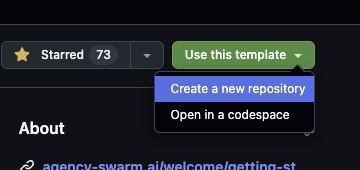
Click **Use this template** and choose **Create a new repository**.
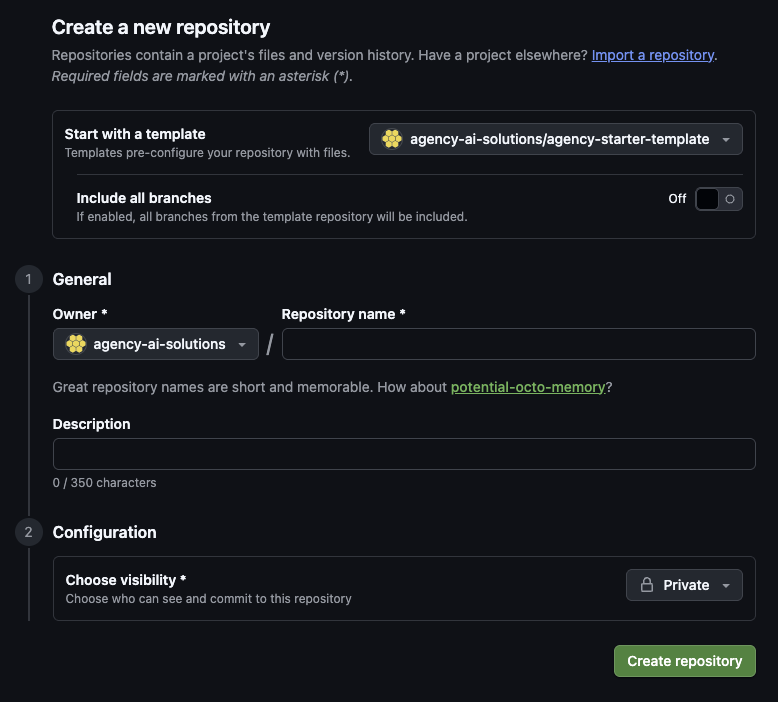
 In the GitHub form:
* Confirm **Start with a template** is `agency-ai-solutions/agency-starter-template`
* Set your owner and repository name
* Choose visibility
* Click **Create repository**
In the GitHub form:
* Confirm **Start with a template** is `agency-ai-solutions/agency-starter-template`
* Set your owner and repository name
* Choose visibility
* Click **Create repository**
 Open the repository you created and follow its `README.md` setup instructions.
This keeps your project on your own repository from day one while preserving the template defaults.
## Why This Template Is Recommended
Keeps AI-assisted development aligned with Agency Swarm conventions.
Matches the intended Agencii flow: create repository, connect, and deploy.
## Next Docs Step
Continue with the Agencii flow and repository connection details.
Optional: review production deployment details.
## Customize With AI IDEs
If you are using Cursor to customize your agents, continue with [AI Agents (Cursor)](/welcome/getting-started/cursor-ide).
If you are publishing reusable agencies to the marketplace, configure onboarding fields in [Marketplace Onboarding](/platform/marketplace/onboarding).
Customize agents and tools with AI assistance.
Use manual setup only when you need full control.
Open the repository you created and follow its `README.md` setup instructions.
This keeps your project on your own repository from day one while preserving the template defaults.
## Why This Template Is Recommended
Keeps AI-assisted development aligned with Agency Swarm conventions.
Matches the intended Agencii flow: create repository, connect, and deploy.
## Next Docs Step
Continue with the Agencii flow and repository connection details.
Optional: review production deployment details.
## Customize With AI IDEs
If you are using Cursor to customize your agents, continue with [AI Agents (Cursor)](/welcome/getting-started/cursor-ide).
If you are publishing reusable agencies to the marketplace, configure onboarding fields in [Marketplace Onboarding](/platform/marketplace/onboarding).
Customize agents and tools with AI assistance.
Use manual setup only when you need full control.