> ## Documentation Index
> Fetch the complete documentation index at: https://agency-swarm.ai/llms.txt
> Use this file to discover all available pages before exploring further.
# OpenClaw
> Deploy your own private OpenClaw assistant on Agent Swarm.
OpenClaw is a personal AI assistant you run in your own environment.
On Agent Swarm, you can launch it from a ready template and chat with it inside your workspace in a few clicks.
Create your own repository from the official OpenClaw starter template.
Learn what OpenClaw can do and how its workspace files work.
## Launch OpenClaw On Agent Swarm
Open [agency-ai-solutions/openclaw-starter-template](https://github.com/agency-ai-solutions/openclaw-starter-template).
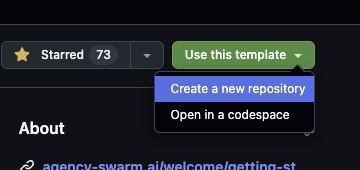
Click **Use this template** and create a repository in your own GitHub account or organization.
 In Agent Swarm, connect your GitHub account and pick the repository you created from the template.
Turn on **Persistent File Storage** for the swarm before the first deploy.
For Agent Swarm deploys, set `OPENCLAW_HOME=/app/mnt/openclaw`.
The file browser should show that same path directly, not a raw `/mnt` root.
Default deploy: add `OPENAI_API_KEY` in **Secrets Vault** before you deploy.
If you later switch away from the default OpenAI GPT-5.4 setup, add the matching provider secret for that model too.
Optional advanced settings:
* `OPENCLAW_PROVIDER_MODEL` only if you want a different provider or model
* `ANTHROPIC_API_KEY` only if you switch to an Anthropic model
* `OPENCLAW_GATEWAY_TOKEN` only if you want to override the internal gateway token
For the first deploy, enter only what is necessary:
* the assistant name
* one short instruction about what it should help with
Add longer role descriptions, multi-step rules, and extra setup in the OpenClaw workspace files after deploy.
Start the deployment, wait for the build to finish, then open the chat and send your first message.
## Customize OpenClaw After Deploy
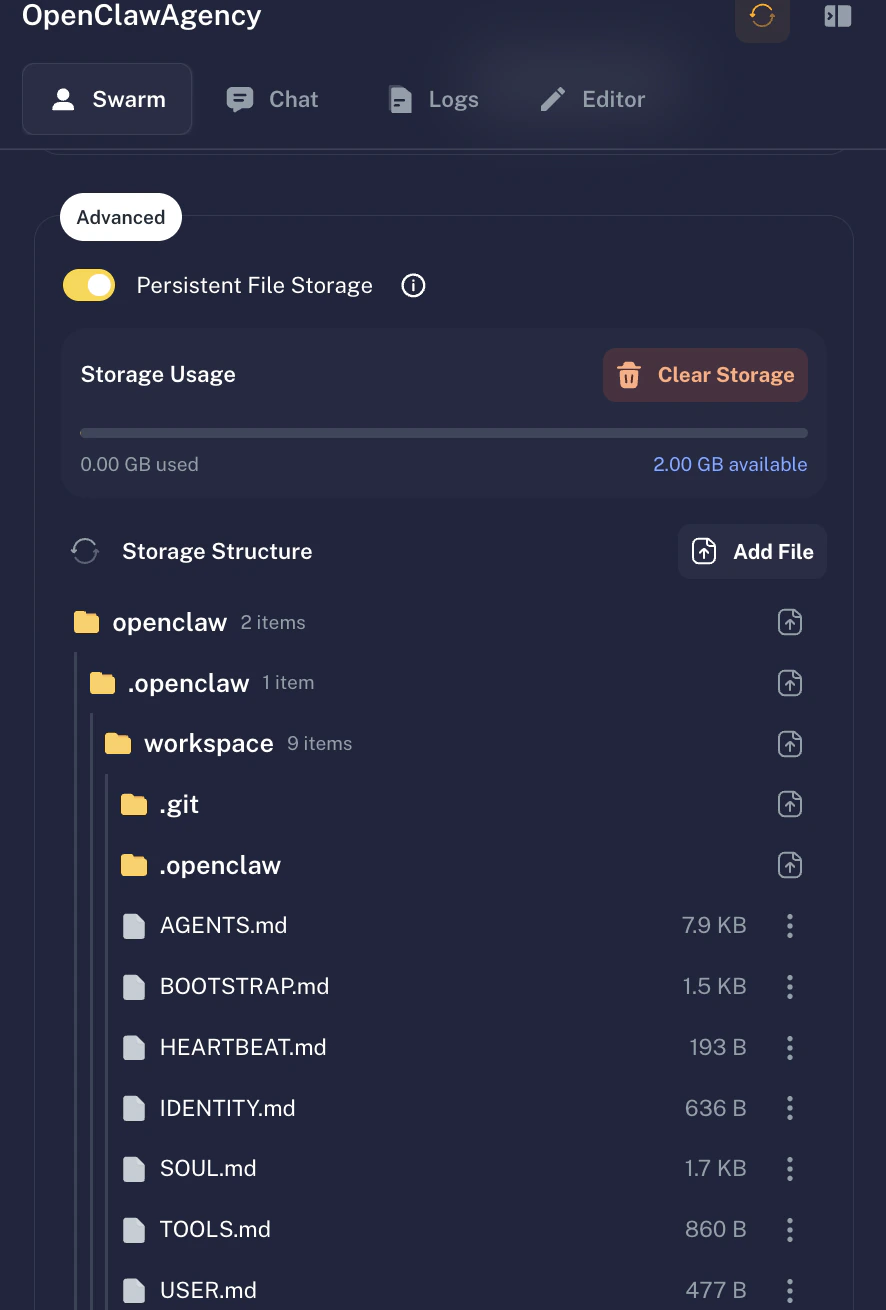
OpenClaw keeps its own workspace files on persistent storage.
That is where you update its personality, rules, and long-term notes.
Agency Swarm now writes the default OpenClaw workspace to `/app/mnt/openclaw/workspace`.
At the storage root, you should also see sibling folders like `logs` and `state`.
The most important files are:
* `AGENTS.md` for operating rules and priorities
* `SOUL.md` for voice, tone, and personality
* `USER.md` for user-specific preferences
* `MEMORY.md` for durable notes you want OpenClaw to keep
To replace them:
1. Open your deployed agent
2. Go to **Customization** -> **Persistent File Storage**
3. Open `/app/mnt/openclaw/workspace`
4. Upload the replacement file
In Agent Swarm, connect your GitHub account and pick the repository you created from the template.
Turn on **Persistent File Storage** for the swarm before the first deploy.
For Agent Swarm deploys, set `OPENCLAW_HOME=/app/mnt/openclaw`.
The file browser should show that same path directly, not a raw `/mnt` root.
Default deploy: add `OPENAI_API_KEY` in **Secrets Vault** before you deploy.
If you later switch away from the default OpenAI GPT-5.4 setup, add the matching provider secret for that model too.
Optional advanced settings:
* `OPENCLAW_PROVIDER_MODEL` only if you want a different provider or model
* `ANTHROPIC_API_KEY` only if you switch to an Anthropic model
* `OPENCLAW_GATEWAY_TOKEN` only if you want to override the internal gateway token
For the first deploy, enter only what is necessary:
* the assistant name
* one short instruction about what it should help with
Add longer role descriptions, multi-step rules, and extra setup in the OpenClaw workspace files after deploy.
Start the deployment, wait for the build to finish, then open the chat and send your first message.
## Customize OpenClaw After Deploy
OpenClaw keeps its own workspace files on persistent storage.
That is where you update its personality, rules, and long-term notes.
Agency Swarm now writes the default OpenClaw workspace to `/app/mnt/openclaw/workspace`.
At the storage root, you should also see sibling folders like `logs` and `state`.
The most important files are:
* `AGENTS.md` for operating rules and priorities
* `SOUL.md` for voice, tone, and personality
* `USER.md` for user-specific preferences
* `MEMORY.md` for durable notes you want OpenClaw to keep
To replace them:
1. Open your deployed agent
2. Go to **Customization** -> **Persistent File Storage**
3. Open `/app/mnt/openclaw/workspace`
4. Upload the replacement file
 If OpenClaw starts behaving strangely, check both the onboarding instructions and the workspace files. They are both part of the final behavior.
If you are upgrading an older deploy, OpenClaw may still have legacy files under `.openclaw/workspace` until the integration migrates them to the cleaner `workspace` path.
## What You Get
* A private OpenClaw deployment running on Agent Swarm
* Normal chat inside your Agent Swarm workspace
* Persistent OpenClaw files under `/app/mnt/openclaw`
* A clean upgrade path through the starter template repo
This deployment is meant for one trusted user or one trusted team.
The provider secrets you add in Agent Swarm are available inside the sandbox so OpenClaw can call model providers.
Review [OpenClaw Security](https://docs.openclaw.ai/gateway/security) before you expose access more broadly.
## Want To Use It In Code?
If you want to use OpenClaw inside your own Agency Swarm code, continue with [OpenClawAgent](/core-framework/third-party-agents/openclaw-agent).
If OpenClaw starts behaving strangely, check both the onboarding instructions and the workspace files. They are both part of the final behavior.
If you are upgrading an older deploy, OpenClaw may still have legacy files under `.openclaw/workspace` until the integration migrates them to the cleaner `workspace` path.
## What You Get
* A private OpenClaw deployment running on Agent Swarm
* Normal chat inside your Agent Swarm workspace
* Persistent OpenClaw files under `/app/mnt/openclaw`
* A clean upgrade path through the starter template repo
This deployment is meant for one trusted user or one trusted team.
The provider secrets you add in Agent Swarm are available inside the sandbox so OpenClaw can call model providers.
Review [OpenClaw Security](https://docs.openclaw.ai/gateway/security) before you expose access more broadly.
## Want To Use It In Code?
If you want to use OpenClaw inside your own Agency Swarm code, continue with [OpenClawAgent](/core-framework/third-party-agents/openclaw-agent).